Why I Started Moving Inference In-House
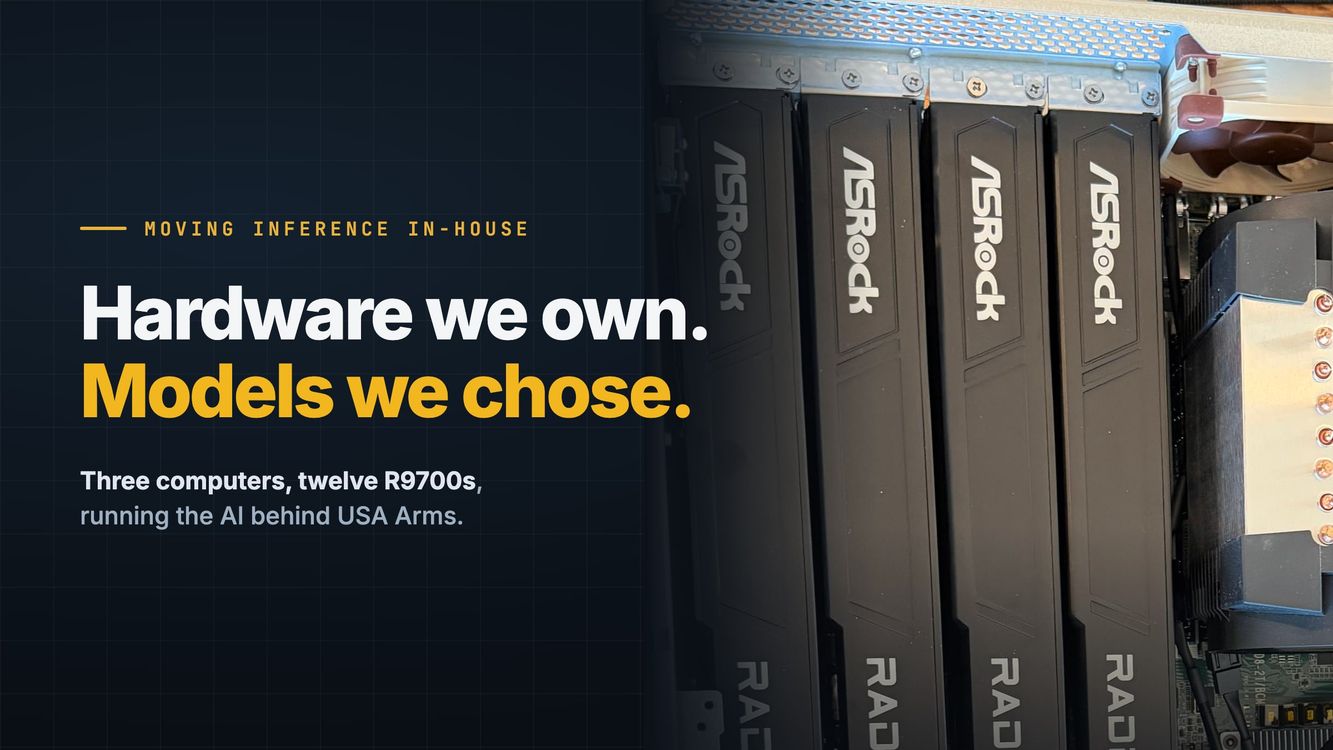
The short version: we built three computers with four AMD Radeon AI PRO R9700 cards each, so we can run the AI behind USA Arms on our own hardware. The video of the build and the free build guide are below.

For years I've built large data-driven websites. The first was an auto loan website in 2007, and I've followed roughly the same business pattern ever since: gather large, poorly organized data and make useful user-facing tools.
The big successes were BroadbandNow.com and BusinessInternet.com. At BroadbandNow we crunched over a billion rows of data to help people research, compare and shop for internet service in their neighborhood, and BusinessInternet.com did the same for businesses. After that came ElderGuide.com, crunching more than 2 billion rows of government data to help families make informed decisions about senior care, and FindEnergy.com, bringing transparency to the energy industry.
How this type of business fares in an AI-first world remains to be seen, but in one of my latest projects, USA Arms, we collect and organize over 10,000 profiles of gun stores, firearms instructors, gunsmiths and more.
From outsourcing to AI
Historically, I used outsourced labor in the Philippines. Doing some rough math, I've easily hired over 100 people in the Philippines between 2008 and 2024, and at least 15 were on my team for a year or more doing data collection or customer service.
When I started building new companies in 2024, I started working toward getting as much of it as possible powered by AI processes.
- 2008–2024People100+ hires in the Philippines, doing data collection and customer service
- 2024 onAI processesAs much of the work as possible, powered by AI
- NextWhat does the future hold?
Getting the harness right
Building an AI-first data enrichment business isn't as easy as it looks from the outside, but I'm finally starting to get the hang of it. Part of it is that the models have gotten better, but a lot of it is that my internal harnesses have gotten better and I've found what doesn't work.
The latest iteration of the production harness on my sites is the result of more than 10 prior iterations that didn't work really well. Some of them I worked on for more than six months before giving up and applying the lessons forward to a new version.
Long story short, I had a great harness that was working well on USA Arms last fall. It relied heavily on structured output, and I enriched the first version of USA Arms in about four months of full-time work. That version was built on Qwen3-Next 80B and ran on six Mac Studios.
It had a lot of problems. Without going into the technical details, it was a deterministic system instead of an agentic one.
When I set out to rewrite the harness again, I wanted it to be a mix of deterministic and agentic, and in my testing Qwen 3.8 27B was a huge leap forward in the quality of small models. It really made local-first possible.
The model changed under us
When OpenAI dramatically cut the price of Luna 5.6 and Luna 6, I decided to go all in on Luna for enrichment, with the plan of moving to Qwen 3.8 27B long term.
All was well and good, and the numbers were decent. But then I started seeing refusals and weird outcomes, both in my personal testing and in the harness. Things that had been working before stopped working, or Luna started failing on weird things:
- It refused to identify an FFL, a licensed gun dealer, because the license holder might be an individual.
- It refused to look at an ammo dealer's website, because it couldn't assist in buying ammo.
- It couldn't tell me a shooting range's policies without more context.
All of these things are normal work for keeping our site up to date. That accelerated our decision to move it all internal as soon as possible.
Why we built our own computers
Last fall we bought six Mac Studios, before local AI models were really usable. (That took some convincing to get my wife on board.)
Initially I had planned on scaling the system with Macs, but when we ran the numbers it was exceedingly clear that Macs weren't the right tool for the job. I have historically loved Macs, but they really aren't great computers to run headless, and I was sick of using Screens 5 to manage them.
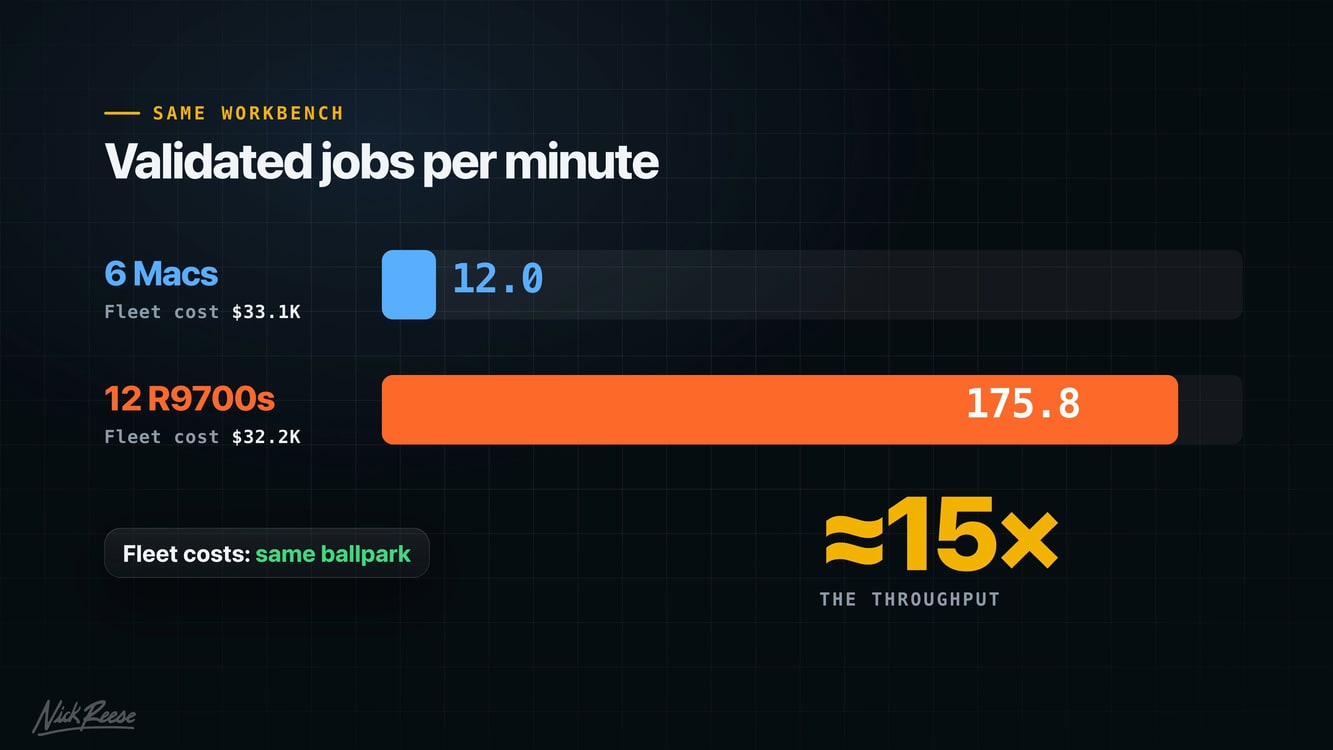
With the goal of moving all my compute in-house, I wanted something Linux-based. And when we looked at our real workload on a small dense model, all six Macs together did about 12 validated jobs a minute. To keep up with USA Arms, we needed A LOT more than that.
I was super deflated when I ran the first estimates. Even with the new M5 Ultra Macs, it looked like it would take another 41 to 56 Mac Studios to handle our workload... about $280,000 to $380,000 before tax.
Now for any sane person, this is an easy "OpenRouter, bro" moment, but I'm a nerd and I want to own my systems and infrastructure. Yes, it has headaches and downsides, but I know my future is in my control, and that has a lot of value to me and my family.
But there was no way I'd be dropping that much on Macs. We did price out a small cluster and renting data center space, but it felt like putting the cart before the horse.
So the plan became: build computers we can run at home, and grow into data center space when our compute requirements outgrow my home lab.
In the end, we built three computers with four R9700s each. On the same workbench where the six Macs did 12 validated jobs a minute, the twelve R9700s did more than 175. They also run our CI/CD, which saves us $300 to $450 a month in rented compute.
How it all fits together
Now, the hardcore Mac AI lovers will notice the numbers I posted are on the low side. I spent about 10 billion tokens over two weeks trying to get AI to tune them, but we kept seeing the Macs' quality drop dramatically on our harness when we used MTP and other tricks. Plus, I knew that long term I wanted them running the big models, where their strength is.
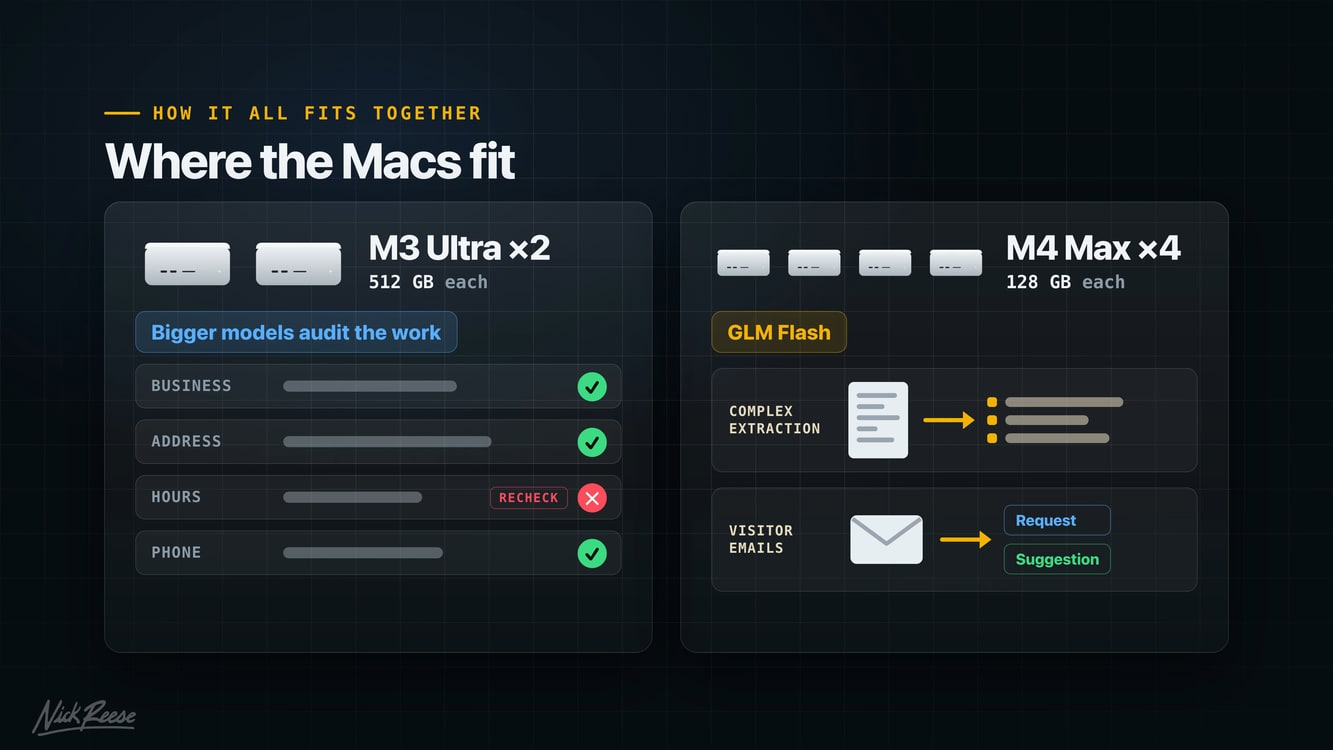
That said, the Macs are still part of the system. The M3 Ultras have 512 GB of memory each, so I can run huge models on them. They're my playground for testing stuff, and they spend their time auditing the work of the smaller models.
The 128 GB M4 Maxes generally run GLM Flash, and I use them for more complex data extraction, auditing the actual site as a user, and doing admin stuff like analyzing visitor emails, requests and suggestions.
The R9700s are the scalable, high-volume inference providers. They don't run the smartest model, but dang if Qwen 3.8 27B doesn't win on pure determination alone. It cranks through huge volumes of work at really acceptable accuracy.
All of it runs on hardware we own, with models we chose. Nobody can change them on us.
Building three R9700 servers
Below is a video of my journey building my first computer in 15+ years and getting it to run our internal inference workflow. As we speak, I've got multiple agents still tuning my models and processes, and that will probably never stop. But with Strata and Qwen 4 on the horizon, I'm super optimistic that local AI is worth it if you value privacy, like control, or play in controversial spaces such as firearms.
Get the build guide
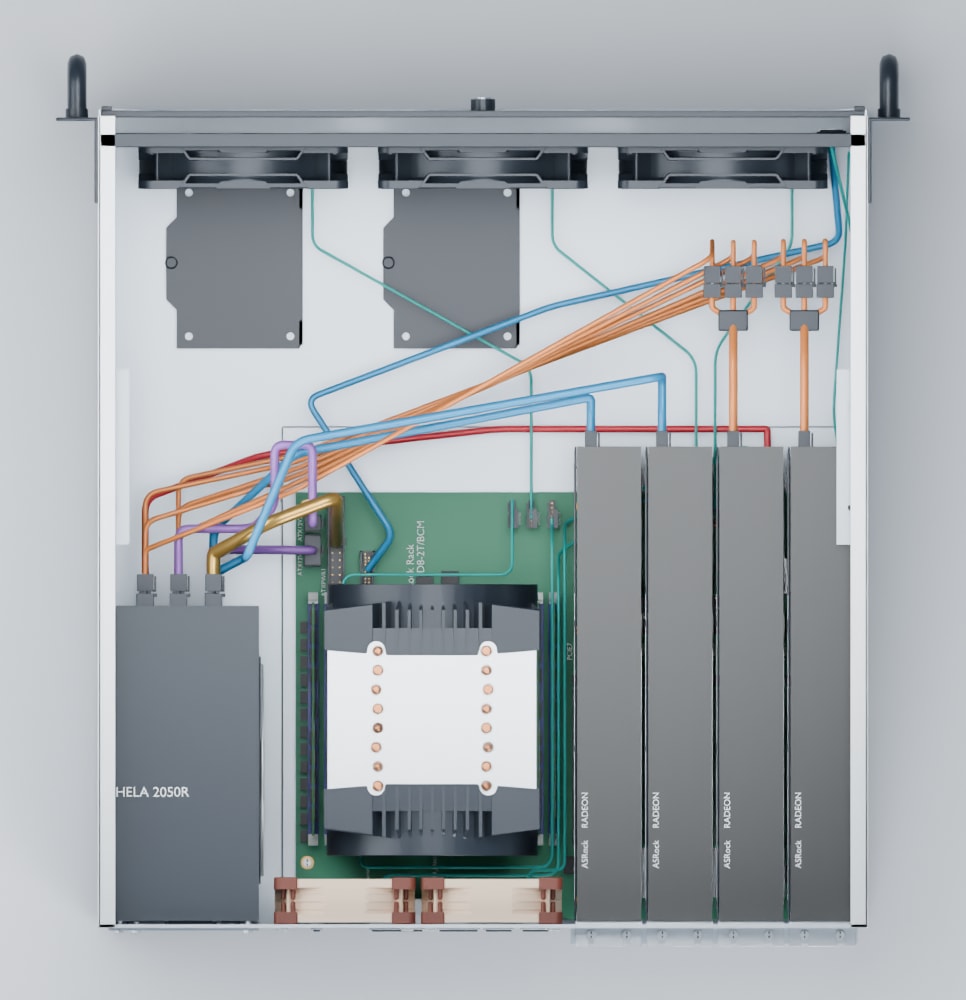
Since I hadn't built a computer in a long time, I spent a bunch of time watching YouTube videos and getting up to speed. So much so that I burnt about 1.6 billion Astra tokens building a full 3D rendering of the build and a step-by-step setup guide, so I could visualize it all and ask questions before building anything. About 900 million of those went to five days of polishing the Blender renderer.
I had agents pull my entire journey together into the beginner's guide I would have wanted.
That was the plan initially. Then I realized that any smart person would just feed the guide to an AI and have it help them build the machine. So I have only skimmed the final guide, but between Claude and Astra I've spent close to 3 billion tokens on the 3D model, the guide and the video, making sure it's useful to humans and AIs if you decide to build it.
- The full parts list and what we paid
- Every build step, with our photos
- The BIOS setup, screen by screen
- How we tuned the fans, and our heat numbers
- The color-coded wiring guide
The guide is an AI compilation of the journey across research, design and building all three computers. It's what worked for us, not professional or electrical advice, so build at your own risk.
What's in each computer
As an Amazon Associate I earn from qualifying purchases. The part links below are affiliate links.
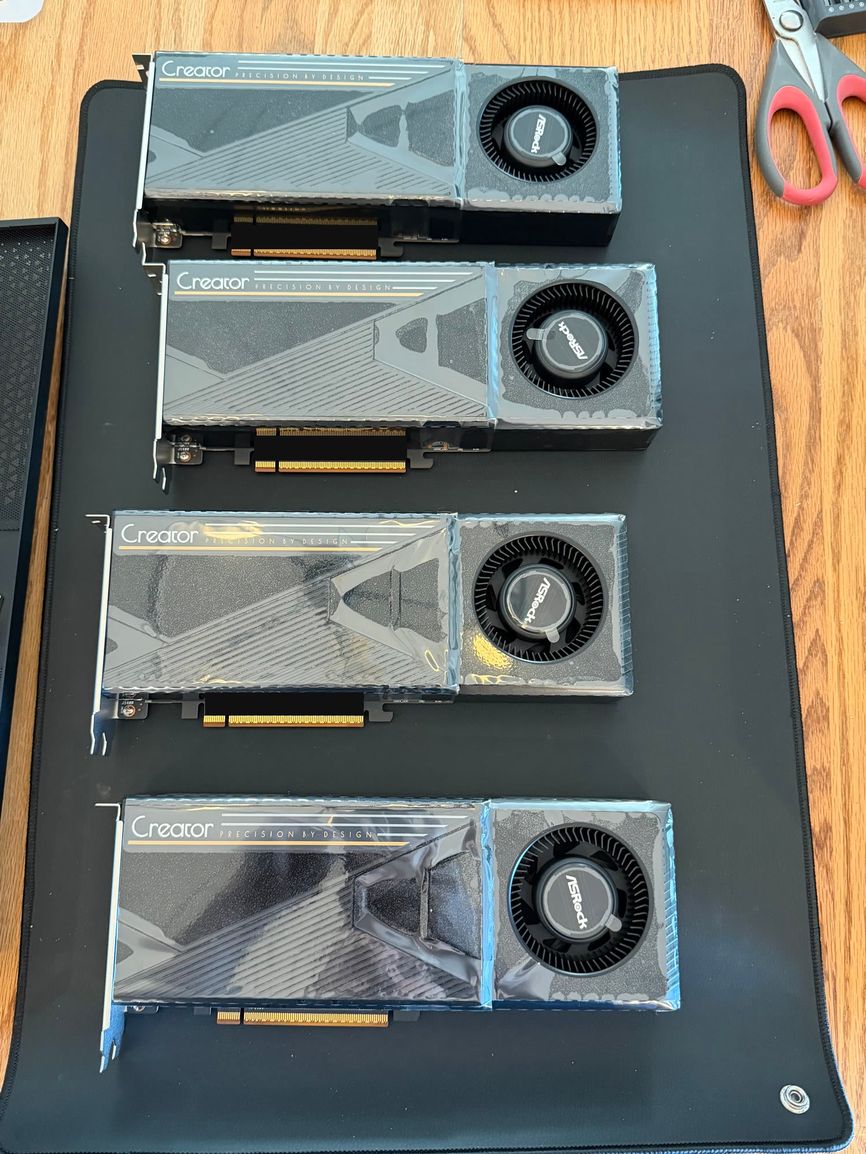 Graphics cards4×ASRock Radeon AI PRO R9700 Creator32 GB each, 128 GB of VRAM per computer. The cards do the AI work; the rest of the computer runs our CI/CD.View on Amazon
- CPUAMD EPYC 745232 cores, socket SP3. Ours were bought used.View on Amazon
- MotherboardASRock Rack ROMED8-2T/BCMSeven PCIe 4.0 x16 slots, two 10 GbE ports and remote management.View on Amazon
- Memory8×Samsung 16 GB DDR4-2666 ECC RDIMM128 GB, one stick in each of the eight memory channels.View on Amazon
- StorageSamsung 990 PRO 1 TBNVMe M.2 SSD for the operating system.View on Amazon
- Power supplySilverStone HELA 2050RPlatinum-rated, with native 12V-2x6 outputs for the cards.View on Amazon
- CaseSilverStone RM444U rackmount case with room for four cards.View on Amazon
- CPU coolerARCTIC Freezer 4U-M Rev. 2Fits socket SP3 and a 4U case.View on Amazon
- Front fans3×ARCTIC P12 Pro PST120 mm intake. Sold as a five-pack.View on Amazon
- Rear fans2×Noctua NF-A8 PWM80 mm exhaust.View on Amazon
- Thermal pasteARCTIC MX-6Plus 99% isopropyl alcohol to clean the CPU first.View on Amazon
- CPU carrierSP3 CPU carrier frameThe plastic frame the CPU sits in. We found ours on eBay.
We bought the cards at Newegg, and the CPUs (used) and carrier frames on eBay. The links go to the same parts on Amazon.
What we paid
Below is what we actually paid for each computer, including tax and shipping. Market prices move constantly, so your shopping list may change. If you found this useful, I'd really appreciate it if you buy through the Amazon links above. Small commissions add up and help me make more videos like this.
| Part | Qty | Paid |
|---|---|---|
| ASRock Radeon AI PRO R9700 Creator, 32 GB | 4 | $7,244.58 |
| AMD EPYC 7452, 32 cores | 1 | $127.17 |
| ASRock Rack ROMED8-2T/BCM motherboard | 1 | $1,162.39 |
| Samsung DDR4-2666 ECC RDIMM, 16 GB | 8 | $860.59 |
| Samsung 990 PRO 1 TB NVMe SSD | 1 | $254.39 |
| SilverStone RM44 4U case | 1 | $388.40 |
| SilverStone HELA 2050R Platinum power supply | 1 | $578.92 |
| ARCTIC Freezer 4U-M Rev. 2 CPU cooler | 1 | $56.96 |
| ARCTIC P12 Pro PST, 120 mm front fans | 3 | $11.51 |
| Noctua NF-A8 PWM, 80 mm rear fans | 2 | $38.06 |
| SP3 / TR4 CPU carrier frame | 1 | $4.58 |
| 99% isopropyl alcohol and ARCTIC MX-6 paste | shared | $6.37 |
| Each computer | $10,733.91 | |
| All three computers | $32,201.72 | |
The four cards are two-thirds of the cost; the rest of the machine is cheap by comparison. I found a really good deal on the CPUs especially, which got me thinking about running our CI/CD pipeline on them. The boards cost us extra: there was a global shortage while we were buying, and I paid import fees to get ours from Helsinki.
What's next
Going forward, I'm going to be doing more home lab content, such as setting up VLANs with UniFi and how to do it well in an "agent-first" world, playing with weird graphics cards and letting AI tune them, and a few other adventures.
I used to make entrepreneur videos. Now I'm moving into more home lab experiments, business, and possibly some firearms content too. If that sounds like your kind of thing, subscribe.